Talk to us
Building an AWS Architecture Advisor with Strands Agents and Amazon Bedrock AgentCore

Category
Tech
Published
May 13, 2026
Everyone's talking about AI agents. I wanted to see how hard it actually is to build one that does something useful, so I built an AWS architecture advisor that connects to a real account, inspects live infrastructure, and answers questions in plain English.
There's a lot of noise right now around AI agents.
Agentic workflows, autonomous systems, and all the usual buzzwords.
I wanted to answer a simpler question: how hard is it to build an agent on AWS that actually does something useful?
Not a chatbot with generic answers. Not a demo held together by a clever prompt. Something that connects to a real AWS account, inspects real infrastructure, and answers practical questions in natural language.
So in this post, I'm building a simple AWS Architecture Advisor.
The idea is straightforward. You ask questions like:
- What EC2 instances are running in eu-north-1?
- Do any security groups have unrestricted inbound access?
- What's my spend by service this month?
- What policies are attached to this IAM role?
And the agent replies using live AWS data.
The stack is Strands Agents, AWS's open-source Python SDK, and AmazonBedrock AgentCore, which provides the managed runtime, memory, and observability.
By the end, you'll have a working agent you can run locally or deploy to AgentCore
What is AmazonBedrock AgentCore?
AgentCore runs and manages your agent without forcing you into a specific framework.
You still define:
- the tools
- the model
- the prompt
- the behavior
AgentCore handles the runtime around it.
For this project, I'm using:
- Runtime
- Memory
- Observability
That's enough to build something useful without adding unnecessary complexity.
AgentCore vs BedrockAgents
The naming is confusing, so it's worth being explicit.
- Bedrock Agents is a fully managed orchestration layer. You define instructions, action groups, and knowledge bases inside AWS.
- AgentCore is different. You build the agent in code using your own framework. AgentCore just runs it.
So:
- BedrockAgents → managed structure
- AgentCore→ managed runtime
For this use case, AgentCore fits better. The agent is mostly a reasoning layer on top of explicit boto3 tools.
What the agent does
This agent is a read-only AWS Architecture Advisor.
It can:
- list EC2 instances
- list security groups
- detect security groups open to 0.0.0.0/0 or ::/0
- get cost breakdown by service
- list IAM policies attached to a role
Small surface area, but already useful.
Everything is read-only on purpose. Before letting an agent take actions, it needs to reliably inspect and explain the environment.
Requirements
Before running the project, make sure you have:
- an AWS account with access to Amazon Bedrock and Amazon Bedrock AgentCore
- Python 3.11+
- AWS CLI configured
- AgentCore starter toolkit installed:
$ pip install bedrock-agentcore-starter-toolkit
- Project dependencies installed:
$ pip install strands-agents boto3 bedrock-agentcore
Defining the tools
With Strands, a tool is just a Python function with a @tool decorator.
What matters most is:
- clear function descriptions
- structured return values
The model uses both to decide when to call a tool and how to interpret the result.
EC2 and security groups
Cost tool
IAM inspection
A few important details:
- tools are small and focused
- all AWS calls handle ClientError
- paginators avoid truncated results
- outputs are structured and predictable
This makes tool selection and reasoning much more reliable.
Wiring the agent
The agent itself is still very small:
The prompt stays short. The tools do the heavy lifting. The model decides when to use them and how to present the result.
One implementation detail that matters:
The model is created at runtime, not at import time. This avoids early connections when the AgentCore runtime loads the module.
Adding memory
Memory integrates cleanly through AgentCore's Strands integration:
If a memory ID is configured:
- the agent gets cross-session context
- conversations persist across calls
If not:
- the agent runs statelessly
This keeps the core logic simple.
Memory is optional, not baked into the design.
Exposing the agent to AgentCore
To run inside AgentCore:
The entry point must be defined at module level. The runtime imports the file and expects the function to exist immediately. If it's hidden behind a condition, the runtime won't find it and you'll get silent failures.
Flow is simple:
- receive payload
- build agent
- execute prompt
- return result
AgentCore assumes an execution role on behalf of your agent. That role defines what the agent can do.
For this project, permissions are read-only:
The role is passed to the starter toolkit during configuration:

Key idea:
- agent code defines capabilities
- IAM role defines permissions
If you add a tool that writes to S3, it won't work until the role allows it. That separation is intentional.
Running it locally
For this example, I added an environment variable, AGENTCORE_RUNTIME, to switch between modes. It defaults to 1 (AgentCore Runtime mode).
For local development, set it to 0:
This starts a simple REPL:
- What EC2 instances are running in eu-north-1?
- Any security groups open to the world?
- What's my spend this month?
Local mode makes iteration much faster. You can test tools and prompts before deploying anything.
Configuring and deploying to AgentCore
Once the IAM execution role is provisioned, you can configure and deploy the agent using the AgentCore CLI.
Step 1: Configure the agent
This tells AgentCore about your entrypoint, runtime, dependencies, and which IAM role to assume:
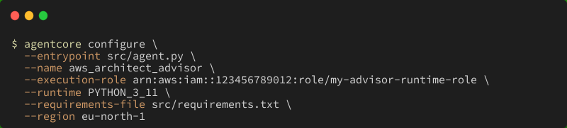
Replace the --execution-role value with the ARN of the IAM role you created for the agent.
This writes a local configuration that AgentCore uses during deployment. You only need to run it once, or again if the role or entrypoint changes.
Step 2: Deploy the agent

AgentCore packages your code, uploads it, and starts the runtime. The first deploy takes a bit longer while the environment is provisioned.
Step 3: Verify the deployment
Check that the agent is running:

You can also tail the runtime logs to watch for errors:

Invoking the deployed runtime
Once deployed, you can send:
- a prompt
- a session ID
The session ID is what enables memory. Without it, every request is isolated. With it, the agent can carry context across interactions.
Some examples:
- using the AgentCore CLI
The simplest way to invoke the agent is through the agentcore CLI:

To maintain context across multiple calls, pass a session_id:


A few more examples:


- invoking from Python
You can also call the agent programmatically using boto3:
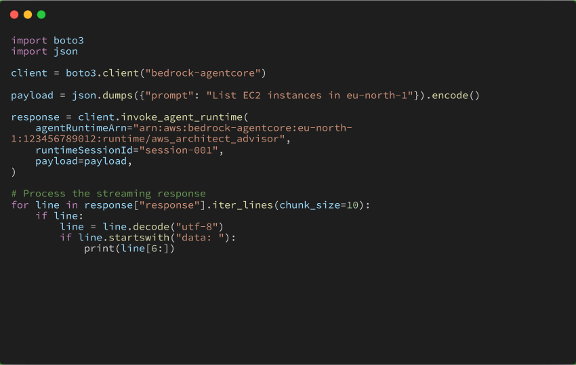
The runtimeSessionId works the same way as in the CLI — reuse it across calls to maintain conversation context.
Observability
AgentCore provides full trace visibility:
- incoming prompt
- selected tool
- tool arguments
- tool output
- final response
This makes debugging much easier.
If something goes wrong, you can tell whether it's:
- wrong tool selection
- correct tool but bad data
- correct data, bad interpretation
A note on security
AgentCore enforces strong isolation. Each session runs in its own microVM with:
- isolated CPU
- isolated memory
- isolated filesystem
When the session ends, everything is terminated and cleaned up.
This matters because agent behavior is non-deterministic. The model can call tools in unexpected ways or handle sensitive data internally. Isolation ensures that data never leaks between sessions.
For this advisor:
- permissions are read-only
- credentials are never exposed to the agent directly
- access is controlled via the execution role
AgentCore also supports:
- inbound authentication (SigV4, OAuth)
- outbound authentication (API keys, OAuth)
For this example, IAM is enough. For production, you would typically add an external auth layer.
Final thoughts
The interesting part of this setup stays in code.
The agent is a small Strands application with a handful of focused tools. AgentCore provides the runtime around it.
At the end, you get an agent that:
- queries real AWS APIs
- answers practical infrastructure questions
- maintains context across sessions
- runs locally for development
- runs in a managed environment when deployed
You control the logic. AgentCore handles the infrastructure.
For this kind of project, that's exactly what you want.